How to Improve Your Salesforce Resume With AI (Without Making Up Numbers) 2026
Facts verified September 23, 2026.
- Written by a Salesforce Product Manager
- Author holds 10 industry certifications
- No computer science degree required
Most advice on using AI for a resume stops at "paste the job description into ChatGPT." That step works, but it skips the part that sinks career changers: AI fills empty spaces with confident numbers you never earned. This guide covers the honest version for Salesforce roles, and it maps to two modules of the Blazer2Role four-module roadmap, Career Storytelling and Asset Building.
To improve your Salesforce resume with AI, use the AI as an editor that asks you questions, not a writer that fills gaps. Give it your real numbers, one target role, and one job posting, then mirror the posting's exact terms. AI cannot know your results, and a number you cannot defend in an interview costs more than it adds.
What can AI actually do for a Salesforce resume?
AI is good at wording, structure, and matching your resume to a job posting, and bad at facts only you know. Salesforce's own recruiters put it in one line on the Salesforce blog in May 2026: "Use it as an editor, not a ghostwriter." The same post asks for "Fewer buzzwords, more evidence," which is the whole problem with an AI-written resume. It reads smoothly and proves nothing.
| Resume task | What AI does well | What you must supply |
|---|---|---|
| Bullet wording | Turns a duty ("responsible for reports") into an action line | What actually happened, and the real number or scope |
| Keyword match | Lists the role title, tools, and certifications a posting names | Which of those you genuinely have |
| Translation from a non-tech field | Suggests Salesforce terms for work you did (workflow, reporting, data quality) | Proof that the work happened at the scale you claim |
| Summary line | Compresses your story into two sentences | The target role and the one result you lead with |
| Formatting | Flags tables, columns, and graphics a screener cannot read | The final file, checked by a human eye |
| Numbers | Nothing. It does not know them | Every figure, from a source you could show an interviewer |
Source: Blazer2Role, built from the Salesforce blog "Ask a Recruiter" (May 2026) and CareerOneStop's Resume Guide (U.S. Department of Labor), as of September 2026.
The risk is not hypothetical. On 23 September 2026, Google's AI Overview for this exact question suggested rewriting "managed reports" as "built 40+ custom reports that increased user adoption by 25%." Those numbers belong to nobody. If you paste a line like that onto your resume, the first interview question about it ends the conversation.
How do you improve a Salesforce resume with AI, step by step?
You improve a Salesforce resume with AI in 7 steps: pick one role and one posting, list your facts, strip private data, make the AI interview you, translate your work, tailor to the posting, and run the interview test. The order matters. Most bad AI resumes come from doing step 4 before step 2.
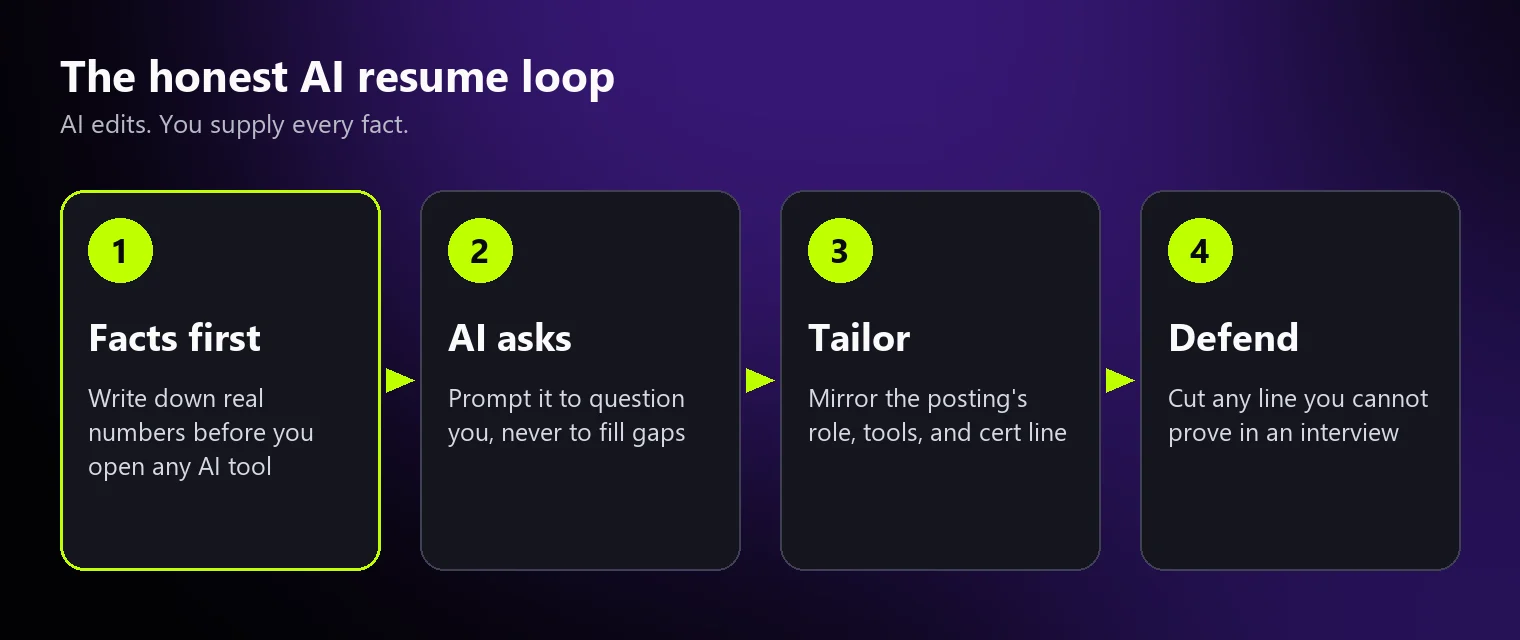
Step 1: Pick one target role and one real job posting
Choose one Salesforce role and one live posting before you touch any AI tool. A resume aimed at "Salesforce Administrator or Business Analyst or Developer" matches none of them. Blazer2Role's own program names six target roles for career changers: Project Manager, Business Analyst, Salesforce Administrator, ServiceNow Developer, Cloud Operations, and Product Owner. If you do not know which one fits, stop here, because no prompt fixes a missing target.
Step 2: Write your fact sheet before you open AI
A fact sheet is a plain list of what you did, how often, for how many people, and with what result, taken from records you could show someone. It is the only thing that stops the AI from inventing. Most career changers have more numbers than they think; they are sitting in old emails, reports, and reviews.
| Your background | Where a real number usually lives | Salesforce skill it can support |
|---|---|---|
| Teacher or trainer | Class rosters, gradebook exports, training attendance sheets | User training, adoption, data quality |
| Healthcare administration | Scheduling system reports, audit results, intake volumes | Workflow design, records management, compliance |
| Sales or account management | CRM reports, quota letters, pipeline reviews | Sales Cloud processes, reporting, forecasting |
| Operations or logistics | Dashboards, ticket queues, month-end reports | Process automation, reporting, cases |
| Customer service | Ticket system exports, satisfaction survey results | Service Cloud cases, knowledge, escalation rules |
Source: Blazer2Role. Examples of where records usually sit, not a promise that yours contain a number; as of September 2026.
Step 3: Remove private details before you paste
Strip your phone number, home address, and any employer figures that are confidential before you paste a resume into a general AI tool. Keep a placeholder such as "[CITY]" instead. Your name and results do not need to leave your computer for the AI to improve the wording, and an employer's internal revenue figure should never go into a chatbot at all.
Step 4: Make the AI interview you, not write for you
The best prompt asks the AI to question you before it rewrites anything. CareerOneStop, the U.S. Department of Labor's career site, suggests prompts that end with "Please ask me questions about my experience to help strengthen the resume." Here is a Salesforce version you can copy:
I am targeting a Salesforce Administrator role. Below is the job posting and my resume.
1. List the role title, tools, and certifications the posting names.
2. Tell me which of them my resume does not show.
3. Ask me one question at a time about my real experience with each gap.
Do not add any number, tool, title, or certification I have not confirmed.
If a bullet has no number, leave a note that says [NEED A REAL NUMBER].
The last two lines do the real work. They turn the AI from a writer into an interviewer, which is exactly the "editor, not a ghostwriter" rule Salesforce's recruiters describe.
Step 5: Translate your work into Salesforce language
Translation means describing the same work in the words a Salesforce hiring manager uses, without changing what happened. The Salesforce blog's admin resume guide puts the goal as showing "the impact of your work," and warns job seekers to "Avoid copying and pasting" example bullets. The table shows the difference between translating and inventing.
| Original bullet | AI rewrite to reject | Honest rewrite |
|---|---|---|
| Responsible for weekly reports | Built 40+ dashboards that lifted adoption 25% | Built the weekly operations report for a team of [your real team size], replacing a manual spreadsheet |
| Scheduled patients across systems | Automated scheduling for 10,000 patients | Coordinated patient scheduling across [your real number] systems, the same workflow logic Salesforce automates with Flow |
| Handled parent complaints | Reduced escalations by 60% | Resolved parent escalations for [your real number] families per term, tracking each case to closure |
| Trained new staff | Trained 500 users on Salesforce | Trained [your real number] new hires on internal systems and wrote the how-to guides they used |
Source: Blazer2Role examples. Brackets mark numbers only you can supply; as of September 2026.
Step 6: Tailor to the posting's exact words
Tailoring means your resume uses the posting's exact role title, tool names, and certification names, spelled the way the posting spells them. It matters because screening is literal. In a Harvard Business School and Accenture study, 88% of employers agreed that qualified high-skills candidates are "vetted out of the process because they do not match the exact criteria established by the job description." Put your Salesforce certification under its current official name, as Salesforce writes it on Trailhead.
Step 7: Run the interview test on every line
Read each bullet out loud and ask: could I explain this for two minutes to a hiring manager, with an example? If not, cut it or soften it. Then add your Trailhead profile link. Salesforce's recruiters say of the profile link: "Add it. Seriously. It's a living résumé that updates every time you complete something new."
Three short videos on the Blazer2Role YouTube channel show steps 5, 6, and the summary line in under a minute each.

Step 5: translating healthcare, admin, and teaching work into tech terms.
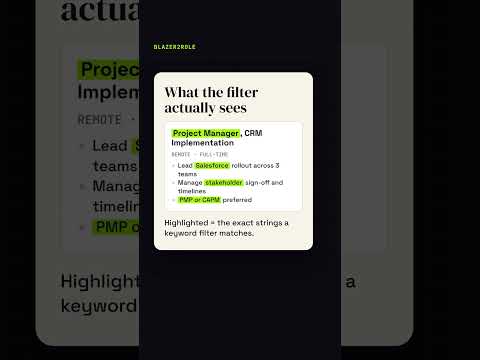
Step 6: the role noun, tools, and certification line a screener matches.

Summary line: replacing the objective paragraph with a proof line.
What should you write if you have no numbers?
If you have no result numbers, write scope numbers instead: how many people, how often, how many systems, over what period. "Supported 4 departments" and "ran the report every Monday for 2 years" are true, checkable, and specific. They beat an invented percentage every time, because a hiring manager can ask about them and you can answer.
Scope numbers are also where AI helps most. Ask it: "For each bullet, suggest what kind of number would make it stronger, and ask me whether I have it." You get a checklist of things to look up, not a list of things to make up. The author of this guide, Dedric Brown, writes his own results the same way on his about page: named employers and figures such as more than 2M legacy CRM records migrated with zero downtime at NCR Corporation.
Which AI tools should you use, and what do they cost?
Any general AI assistant can do the editing in steps 4 to 6, so the tool matters less than the prompt and the fact sheet. CareerOneStop names ChatGPT and Microsoft Copilot as examples and notes that "These tools change frequently." Fairly compared, the options look like this.
| Option | Cost | Where it wins | Where it falls short |
|---|---|---|---|
| General AI assistant (ChatGPT, Microsoft Copilot, Claude) | No-cost tiers exist; paid plans vary | Flexible rewriting and question-asking with a good prompt | Invents numbers if you let it; no Salesforce hiring context |
| Resume-specific AI builders | Often a no-cost basic version, paid upgrades | Templates and ATS-safe formatting | Generic bullets; upgrades usually cost extra |
| American Job Center | No cost | Local staff who offer job search assistance, including a human read of your resume | Staff are generalists, rarely Salesforce specialists |
| Blazer2Role resume scorer | No charge to scan; email required | Scores your resume against a Salesforce role and a posting you paste | Scores and flags; it does not rewrite the resume for you |
| Blazer2Role Branding Support | $250 USD one-time | "Professional resume rewrite & optimization" with "1-on-1 coaching session" | A paid service; "Consultation only, no course included" |
Source: CareerOneStop (U.S. Department of Labor) and Blazer2Role pricing, as of September 2026. Third-party prices change often; check each tool's own pricing page.
The American Job Center row is the one most guides skip. American Job Centers offer job search assistance in person, and the CareerOneStop American Job Center finder locates yours by ZIP code. A human reader at a local center is a good second check after the AI pass. Blazer2Role is US-based and fully remote, so its tools work the same in every state, but hiring does not: Salesforce roles differ by metro and by remote versus onsite, so tailor each resume to the posting's location line, not a national average.
How do you check the AI's work against a real job posting?
Check the finished resume by scoring it against the same posting you tailored it to, then fix what the score flags. Blazer2Role built a resume scorer for this step. It reads your PDF or pasted text, takes the job posting as an optional input, and returns two scores: ATS Match and Transition-Ready. You can score your resume against a job post on the Blazer2Role home page.
| What the scorer rates | What it looks for |
|---|---|
| Keyword match vs job description | The posting's role title, tools, and certifications in your text |
| ATS formatting and parseability | A layout a screening system can read (it reads the PDF layout, not only the text) |
| Quantified impact | Real numbers and scope in your bullets |
| Skills match for the niche | Skills that fit the Salesforce role you picked |
| Action verbs and clarity | Plain, specific lines instead of duties |
Source: Blazer2Role resume scorer configuration, read on September 23, 2026. Target roles offered: Salesforce Administrator, Salesforce Business Analyst, Salesforce Developer, Sales Cloud Consultant, Agentforce / AI Specialist, Product Manager, Data Analyst, Tech Sales / SDR.
Tool facts come from the scorer's live settings and its source code, read on September 23, 2026. The 88% figure is from "Hidden Workers: Untapped Talent" (Harvard Business School and Accenture, September 2021), a survey of 2,275 executives and 8,720 workers in the US, UK, and Germany. Recruiter quotes are from the Salesforce blog. Blazer2Role has no member dataset, so this page publishes no success rate, and the scorer's score is a checklist, not a prediction of callbacks.
Do you need to pay anyone to fix your Salesforce resume?
Many readers do not need to pay anyone: a clear target role, an honest fact sheet, a general AI tool, and a scored check cover most of the work. Paid help makes sense when the gap is positioning, not wording. Two questions sort which case you are in, and one answer is "buy nothing."
Are you already getting interviews for Salesforce roles?
Yes: your resume is doing its job. You may not need to buy anything. Put the effort into interview practice instead.
No interviews yet. Do you know which Salesforce role you are targeting?
Yes, I know my target role
Run the 7 steps and score the result first. If the score stays low and you want a professional to rewrite it, Branding Support is $250 USD one-time and covers the resume and LinkedIn rewrite with one coaching session.
No, I am not sure which role fits
A resume rewrite will not fix a missing target. The Launch Package, $599 USD one-time, includes a 60-minute coaching session, a tailored resume rewrite, and "Application targeting strategy." Compare every tier on the pricing page.
This is a rough sort, not advice. The 1-on-1 session in every package is where the real recommendation happens.
If you are also studying for a certification, note that the Salesforce exam fee is not included in any Blazer2Role tier. Blazer2Role's own FAQ also says: "We do not guarantee job placement." A better resume gets read; it does not get you hired on its own. For the wider career-change picture, see the guide to the tech career transition course.
Score your resume against a job post
Questions people ask about improving a resume with AI
Can AI help me fix my resume?
Yes. AI can fix wording, structure, and keyword gaps, especially when you paste one job posting and ask it to list what your resume does not show. It cannot fix missing facts. Ask it to question you about your real experience and to leave a marked gap wherever a number is missing, instead of letting it fill that gap with a figure you never earned.
Do recruiters care if you use AI for a resume?
Most recruiters care about the content, not the tool. CareerOneStop, the U.S. Department of Labor's career site, says recent employer surveys show most are supportive of job seekers using AI to write or edit resumes. What recruiters dislike is generic, unprovable language; Salesforce's recruiters ask for "Fewer buzzwords, more evidence" on the Salesforce blog.
Can employers tell if you use ChatGPT for a resume?
Often they can tell from the writing rather than from software: stacked buzzwords, identical phrasing across applicants, and numbers that collapse under one follow-up question. We know of no screening tool proven to reliably flag AI-written text. The safer test is yours: if a line does not sound like you in an interview, rewrite it until it does.
Is it legal to use AI to write a resume?
Using an AI tool to draft or edit your own resume is a normal practice, and CareerOneStop answers "Can I use AI to write my resume?" with "Yes, you can!" The risk is false content, not the tool. An invented title, credential, or number can cost you an offer when it is checked. This is general information, not legal advice.
Is Claude or ChatGPT better for resume writing?
Either works for a Salesforce resume, because the result depends more on your prompt and your fact sheet than on the model. Use the one you already know, give it one target role and one posting, and tell it not to add any number, tool, or certification you have not confirmed. Then check the result against the posting with a scorer or a human reader.
Should I put my Trailhead profile on my Salesforce resume?
Yes. Salesforce's own recruiters recommend it, calling the profile "a living résumé that updates every time you complete something new." Add the link near your contact line, list certifications under their current official Salesforce names, and make sure the profile is public so a recruiter can open it without signing in.
The bottom line
AI makes a Salesforce resume clearer and better matched to a posting, and it makes it worse the moment it starts supplying facts. Keep the facts yours, let the AI edit and ask questions, tailor to one posting, and cut any line you cannot defend. That process costs nothing but time.
Sources
- Salesforce blog, "Ask a Recruiter: How Do I Get AI-Ready Without a Technical Background?" (May 2026)
- Salesforce blog, "Craft Your Next Resume Using the Salesforce Admin Skills Kit" (March 2024)
- CareerOneStop (U.S. Department of Labor), Resume Guide: Writing your resume
- CareerOneStop, American Job Center Finder
- Harvard Business School and Accenture, "Hidden Workers: Untapped Talent" (September 2021)
- Salesforce Trailhead, credential verification
This article is general information, not personal career advice. Blazer2Role sells the coaching and resume services described here, including Branding Support and the Launch Package. Questions or corrections: support@blazer2role.com.